
This blog post provides information about the orchestration context available to orchestration processors in the Orchex Enterprise Orchestration Engine (EOE).
Update 15.Dec.2025: After years of frustration with WordPress, I am finally abandoning this blog. The content will likely stay here for some time, but new content will appear here:
This post is a member of a collection that introduces enterprise orchestration engine concepts relevant to the Orchex EOE:
Orchestration Processes and Processors
An orchestration process consists of some number of orchestration processors. Clients, including browsers and applications on servers, can initiate orchestration processes by invoking an orchestration processor. An orchestration process accepts an input JSON payload and return a response payload. Each processor in an orchestration process can invoke webservice APIs and use JavaScript to manipulate the payload.
Orchestration Context
An orchestration context is a data structure used to pass data through an orchestration process. For each orchestration process, Orchex constructs an orchestration context. The orchestration context is separate from the payload constructed during the orchestration process, but includes a copy of the input payload. Unlike the orchestration payload, consider the orchestration context to be read-only.
An orchestration context contains:
- A unique identifier for the current orchestration process
- A timestamp that indicates when the current orchestration process began
- Flags to enable or disable verbose and debug modes
- Information about the HTTP request that invoked the current orchestration process (if any)
- The output of any processors previously invoked during the current orchestration process
After the orchestration engine invokes a processor, which can update the orchestration payload, the orchestration context adds the response of that orchestration processor to the orchestration context. Therefore, responses from all invoked processors are available to subsequent processors in the orchestration process through orchex_context.orchex_processors. You can use this feature of orchestration context to pass data from one processor to others used later in the orchestration process.
Reviewing the Orchestration Context
The orchestration context can be useful for examining and debugging orchestration processes, especially if you cannot access the server console that contains more detailed information. For some tasks, evaluating the orchestration context can be more efficient than looking at the console or reviewing logs.
Eventually, we expect Orchex to include a browser-based debugger that allows passing a payload to a processor and seeing the result of the orchestration process, including the orchestration context. For now at least, if debug is enabled for an orchestration process, then the final orchestration processor can add the orchestration context to the payload for diagnostic purposes. Of course, Orchex must restrict access to debug mode in production.
Orchestration Context in Rust vs. JavaScript
Orchex is a server application implemented in Rust. The orchestration engine uses virtual machines to run JavaScript including that coded into orchestration processors. The orchestration engine defines the orchex_context variable to make orchestration context data available to JavaScript as JSON. Because Orchex serializes the Rust representation to JSON for each processor, data written to orchex_context by orchestration processors will be lost. Instead, use processor output to pass data through an orchestration process.
Example Processor to Return Orchestration Context
The following example processor returns the unmodified payload passed to it. If debug is enabled, it adds the orchestration context to that response.
{
  "key": "demo-context",
  "postrunscript": {
    "block_type": "js_inline",
    "content": "

let response = { 'payload': orchex_payload };

if (orchex_context.debug) {
  response.orchex = { context: orchex_context };
}

result = response;

"

  }
}

./json/processors/demo/context.json
We can use curl to call this processor, passing some arbitrary data and enabling debug mode:
time curl -X POST http://127.0.0.1:3030/processors/demo-context/invoke?isa=qsparam -H "Content-Type: application/json" -d '{"isin": "thepayload", "orchex": {"debug": true, "verbose": true }}' 2> /dev/null| jq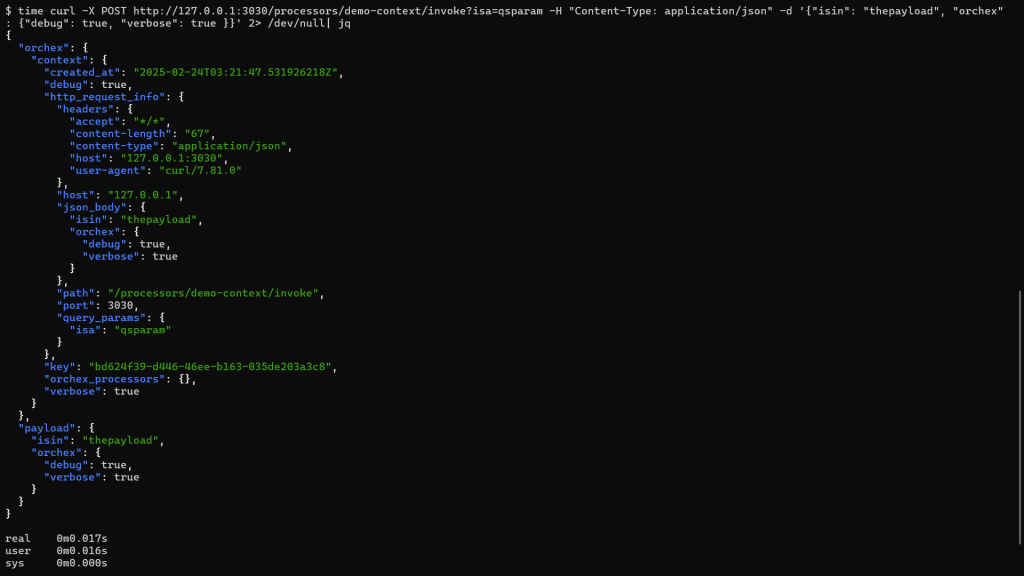
Here is the resulting JSON for this example:
{
  "orchex": {
    "context": {
      "created_at": "2025-02-24T03:21:47.531926218Z",
      "debug": true,
      "http_request_info": {
        "headers": {
          "accept": "*/*",
          "content-length": "67",
          "content-type": "application/json",
          "host": "127.0.0.1:3030",
          "user-agent": "curl/7.81.0"
        },
        "host": "127.0.0.1",
        "json_body": {
          "isin": "thepayload",
          "orchex": {
            "debug": true,
            "verbose": true
          }
        },
        "path": "/processors/demo-context/invoke",
        "port": 3030,
        "query_params": {
          "isa": "qsparam"
        }
      },
      "key": "bd624f39-d446-46ee-b163-035de203a3c8",
      "orchex_processors": {},
      "verbose": true
    }
  },
  "payload": {
    "isin": "thepayload",
    "orchex": {
      "debug": true,
      "verbose": true
    }
  }
}
Here we can see what the server does. The darker blue is invoked JavaScript. The lighter blue is the output of that JavaScript.

Here’s an example that uses multiple processors (more details at https://deliverystack.net/2025/02/01/orchex-simple-processor-examples/):
time curl -X POST http://127.0.0.1:3030/processors/demo-math-c/invoke?isa=qsparam -H "Content-Type: application/json" -d '{"isin": "thepayload", "orchex": {"debug": true, "verbose": true }}' 2> /dev/null| jq
{
  "orchex": {
    "context": {
      "created_at": "2025-02-24T03:40:17.090296580Z",
      "debug": true,
      "http_request_info": {
        "headers": {
          "accept": "*/*",
          "content-length": "67",
          "content-type": "application/json",
          "host": "127.0.0.1:3030",
          "user-agent": "curl/7.81.0"
        },
        "host": "127.0.0.1",
        "json_body": {
          "isin": "thepayload",
          "orchex": {
            "debug": true,
            "verbose": true
          }
        },
        "path": "/processors/demo-math-c/invoke",
        "port": 3030,
        "query_params": {
          "isa": "qsparam"
        }
      },
      "key": "9cfb42eb-333a-4831-ad32-8cccf358a6a4",
      "orchex_processors": {
        "demo-math-a": {
          "output_json": {
            "a": 5
          },
          "processor": "demo-math-a",
          "status": "Success"
        },
        "demo-math-b": {
          "output_json": {
            "b": 7
          },
          "processor": "demo-math-b",
          "status": "Success"
        }
      },
      "verbose": true
    }
  },
  "response": {
    "result": 12
  }
} deliverystack.net
2 thoughts on “-What Is an Orchex Orchestration Context?”