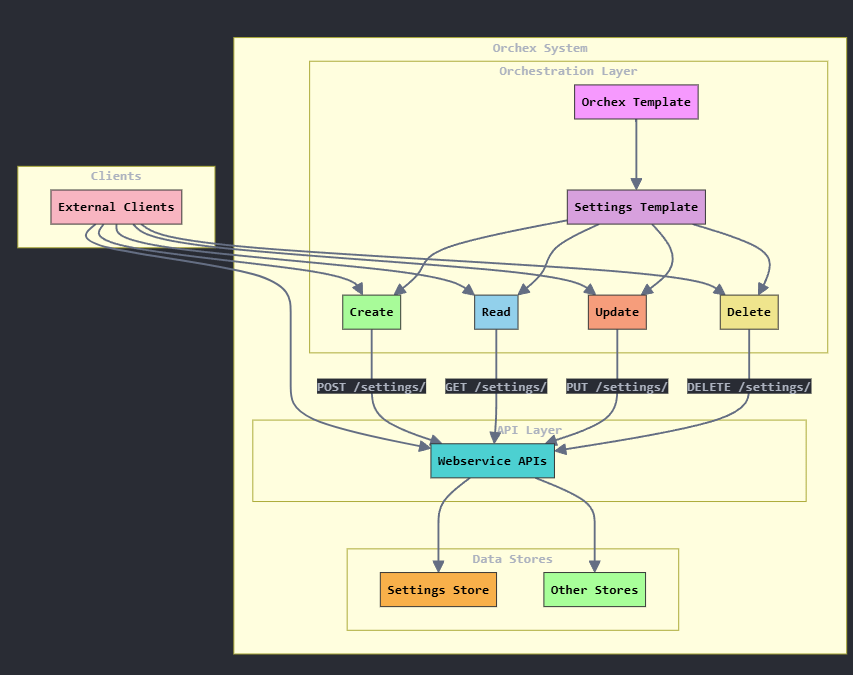
This blog post is about wrapping EOE webservice APIs with orchestration processes with the Orchex Enterprise Orchestration Engine.
Update 15.Dec.2025: After years of frustration with WordPress, I am finally abandoning this blog. The content will likely stay here for some time, but new content will appear here:
Recently, in a post about webhooks, I mentioned the possibility of Orchex not exposing its APIs but instead implementing orchestration processors that invoke those APIs:
This would make Orchex services configurable, as individual implementations could alter or replicate such orchestration processes. I decided to give it a try for the four CRUD operations around Orchex settings (POST, GET, PUT, and DELETE), which all use /settings/<key> as the URL path.
First, I created a template processor from which *all* Orchex store services can inherit (settings is just one of the stores). For now, I hard-coded some values in this template, but we will change those to JavaScript expressions after we make the site configuration data available to JavaScript, likely through the orchestration context.
Update: These JSON fragments are obsolete. All properties relevant to webservice APIs have moved under a root webapi key.
{
    "key": "orchex-template",
    "protocol": {
      "block_type": "literal",
      "content": "http"
    },
    "domain": {
      "block_type": "literal",
      "content": "127.0.0.1"
    },
    "port": {
        "block_type": "literal",
        "content": "3030"
    }
}

./json/processors/orchex/template.json
Any processor that inherits from this one will call Orchex webservice APIs at http://127.0.0.1:3030.
Then, I created a template for settings services, which inherits from orchex-template.
{
  "key": "orchex-settings-template",
  "inherits": "orchex-template",
  "rootpath": {
    "block_type": "literal",
    "content": "/settings"
  },
  "path": {
    "block_type": "js_inline",
    "content": "result = '/' + orchex_payload.key;"
  },
  "prerunscript": {
    "block_type": "js_inline",
    "content": "result = orchex_payload.setting;"
  },
  "postrunscript": {
    "block_type": "js_inline",
    "content": "

orchex_response.setting = orchex_payload;
let response = { response: orchex_response };

if (orchex_context.debug) {
  response.orchex = { context: orchex_context };
}

result = response;
"
  }
}

./json/processors/orchex/settings/template.json
Any processor based on this template will call the webservice API at http://127.0.0.1/setting/<key>, where <key> is the setting key passed in the payload.
The Orchex webservice API only wants the setting details, so the prerunscript reduces the payload to just those values.
The postrunscript constructs a response that consists of the payload passed to the Orchex webservice API, the response from that API, and debug information if debug is enabled.
Based on this, here is an orchestration processor that creates (POSTs) a setting. The comment at the top gives an example of how to invoke it:
/*

curl -X POST http://127.0.0.1:3030/processors/orchex-settings-create/invoke -H "Content-Type: application/json" -d '
{
  "orchex": {
    "debug": true,
     "verbose": true
  },
  "setting": {
    "key": "key",
    "description": "This is a test setting.",
    "dontexportkey": false,
    "dontexportvalue": false,
    "encrypted": false,
    "valueperenv": true,
    "values": ["value"]
  }
}' | jq | batcat -l json

*/

{
  "key": "orchex-settings-create",
  "inherits": "orchex-settings-template",
  "method": {
    "block_type": "literal",
    "content": "POST"
  }
}

./json/orchex/settings/create.json
Create is a POST to the URL defined by the template. The same is true for the rest of the services.
Read (GET):
/*

curl -X POST http://127.0.0.1:3030/processors/orchex-settings-get/invoke -H "Content-Type: application/json" -d '
{
    "orchex": {
    "debug": true,
     "verbose": true
  },
  "setting": {
    "key": "key"
  }
}' | jq | batcat -l json

*/

{
  "key": "orchex-settings-get",
  "inherits": "orchex-settings-template",
  "method": {
    "block_type": "literal",
    "content": "GET"
  }
}

./json/orchex/settings/get.json
Update (POST):
/*

curl -X POST http://127.0.0.1:3030/processors/orchex-settings-update/invoke -H "Content-Type: application/json" -d '
{
  "orchex": {
    "verbose": true,
    "debug": true
  },
  "setting": {
    "key": "key",
    "description": "This is a test setting.",
    "dontexportkey": false,
    "dontexportvalue": false,
    "encrypted": false,
    "valueperenv": true,
    "values": [
      "new"
    ]
  }
}' | jq | batcat -l json

*/

{
  "key": "orchex-settings-create",
  "inherits": "orchex-settings-template",
  "method": {
    "block_type": "literal",
    "content": "PUT"
  }
}
Delete (DELETE):
/*

curl -X POST http://127.0.0.1:3030/processors/orchex-settings-delete/invoke -H "Content-Type: application/json" -d '
{
  "orchex": {
    "verbose": true,
    "debug": true
  },
  "setting": {
    "key": "key"
  }
}' | jq | batcat -l json

*/

{
  "key": "orchex-settings-get",
  "inherits": "orchex-settings-template",
  "method": {
    "block_type": "literal",
    "content": "DELETE"
  }
}
It may be worth noting that Orchex itself might (at least sometimes) call its own APIs directly rather than calling the corresponding orchestration processes, especially at startup before it is possible to call orchestration processes. And I’m not sure whether to expose our webservice APIs and document the difference between accessing the APIs and accessing the orchestration processes that wrap them, or if we should actually require implementations to call the orchestration processes instead.
 deliverystack.net